请马上登录,朋友们都在花潮里等着你哦:)
您需要 登录 才可以下载或查看,没有账号?立即注册
x
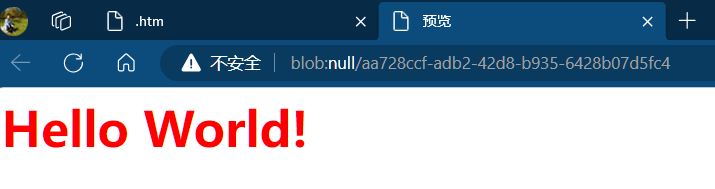
<button type="button" id="btnTest">点击我预览效果</button>

<script>

function preView(code) {
    // HTML代码转DOM实体
    const doc = new DOMParser().parseFromString(code, 'text/html');

    // 添加meta标签(用于定义网页字符集)
    const metas = doc.getElementsByTagName('meta');
    let hasCharset = false; // 字符集meta未定义
    // 遍历meta标签
    for (let j = 0; j < metas.length; j ++) {
        if (metas[j].hasAttribute('charset')) {
            hasCharset = true; // 字符集已定义
            break;
        }
    }
    // 若未定义字符集则创建meta标签
    if (!hasCharset) {
        const meta = document.createElement('meta');
        meta.setAttribute('charset', 'utf-8');
        doc.head.prepend(meta);
    }

    // 若不存在title标签创建之
    if (!doc.title) {
        const title = document.createElement('title');
        title.textContent = '预览';
        doc.head.appendChild(title)
    }

    // 获取完整HTML代码文本
    const content = doc.documentElement.outerHTML;

    // 预览
    const codeBlob = new Blob([content], { type: 'text/html' });
    const tmpUrl = window.URL.createObjectURL(codeBlob);
    window.open(tmpUrl, '_blank');
}
    // 故意令代码结构不完整
    let htmlCode = `<body>\n<style>\nh1 { color: red; };\n</style>\n<h1>Hello World!</h1>\n</body>`;
    btnTest.onclick = () => preView(htmlCode);

</script>
| 



 发表于 2026-6-7 19:23
 提升卡
提升卡 置顶卡
置顶卡 沉默卡
沉默卡 喧嚣卡
喧嚣卡 变色卡
变色卡 千斤顶
千斤顶 显身卡
显身卡 楼主
楼主


 发表于 2026-6-7 21:45